A sample Facebook application with CodeIgniter.
Posted on: January 20, 2008
- In: CodeIgniter | Facebook
- 151 Comments
I was searching a Facebook application example with CodeIgniter today. There weren’t many tutorials on it so decided to give a try for FB application with CI. So let’s see what and how I did it.
I’m assuming you know how to setup a FB application. If you don’t then please visit here, this is a great step-by-step process to start a FB application.
Well, if you are done setting up the process according to the instruction, you supposed to have few things in your hand: an API key, Secret key, Callback URL and base URL.
Now you need to Download the latest version of CodeIgniter and unzip the folder in your Base URL location. Set base URL from application/config/config.php
Example : $config[‘base_url’] = “http://apps.facebook.com/your-app-name/”;
Ok, now set your default controller from here: application/config/routes.php
Default controller is “welcome” – for sample application I didn’t change it. I just worked on default controller. You can change it according to your needs. If you want to use different controller keeping default controller as it is then add that controller name to your Callback URL.
Now let’s download the Facebook client library from here:
Once you have this package in your hand place them in your application/plugins (if there is not folder named plugins then create it) folder. Note that, you can also add the library in the library folder.There are only three files of FB client library- place them in your plugins folder. But don’t forget to rename your facebook.php to facebook_pi.php
Yay ! We are done all initial setting stuffs. Now need to see some actions!
Open you default controller (in my case “Welcome” controller).
First of all we need to create a __Contrust class so that it gets initiated for the first time application user.
So our construct class will be look like this:
  class Welcome extends Controller {
  var $facebook;
  //API and secret key that you got from your application setup.
  var $__fbApiKey = 'YourKey';
  var $__fbSecret = 'YourSecretKey';

function __construct()
{
parent::__construct();
  //load the client library that we added as plugin in plugins folder.
  $this->load->plugin('facebook');
  // Prevent the 'Undefined index: facebook_config' notice from being thrown.
  $GLOBALS['facebook_config']['debug'] = NULL;
  // Create a Facebook client API object.
  $this->facebook = new Facebook($this->__fbApiKey, $this->__fbSecret);
  $user = $this->facebook->require_login();
}
	function Welcome() {
		parent::Controller();
	}
	// You should place your Controller's methods below.
function index()
{
   // Retrieve the user's friends and pass them to the view.
   $friends = $this->facebook->api_client->friends_get();
   $this->load->view('welcome_message' , array("friends"=>$friends));
}
So we have called Facebook API key and secret key and then we loaded the client library that we added as plugin in plugins folder. At the end we checked if the user is logged in or not. Well, you can avoid it by defining a Session key. But I found it was easier to avoid Session key problem with the application by allowing users logged in first.
We supposed to get connected with FB API by this time. So let’s play with FB API now. Create a function called index () and lets retrieve logged in user’s all friends from it.
So it should look like this
function index()
{
   // Retrieve the user's friends and pass them to the view.
   $friends = $this->facebook->api_client->friends_get();
   $this->load->view('welcome_message' , array("friends" , $friends));
}
So we got our friends list in “friends” array. Let’s go to “welcome_message” view in view folder to retrieve and show all friends that the array is containing. My view looks like this bellow.
<h3>Welcome to Sample Facebook application with CodeIgniter!</h3>
<div class="container">
< ?php
foreach ($friends as $id)
{
?>
<div class='img'>
	<fb :profile-pic uid='<?=$id?>' firstnameonly = 'true' linked='true' size='square'/>
<div class='name'>
		<fb :name uid='<?=$id?>' firstnameonly = 'true' capitalize='true'  useyou = 'false'/>
	</fb></div>
</fb></div>
< ?php
}
?></div>
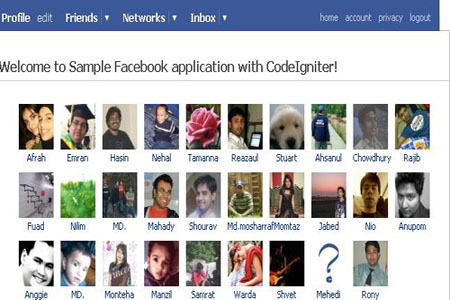
Two facebook tags are added here. One is for Profile picture of my friends and second tag is to show my friends name. I have also added three more CSS class to show it a little bit better.
They are:
 .img {
  float: left;
  padding : 10px 0px 0px 10px;
  width:50px;
  overflow: visible;
}

.name {
  padding-top: 0px;
  text-align: center;
}

.container
{
  padding-left:18px;
}
You can add this at the top of your view page in the <style> tag.
Now let’s go to the FB canvas and see what is my page is showing. From the above example my canvas page shows the output like this:
Okay, if you want to add database, you just need to configure your application/config/databse.php file. Rest of the things are same.
Ahh ! It’s cool. I guess if I use any FW for FB application first I will check the volume of the application. I think there is no meaning to use FW for a small FB application.
Update: This post is updated on 2nd Apr 2010. Thanks @gevork for updating the code.
151 Responses to "A sample Facebook application with CodeIgniter."


January 26, 2008 at 12:13 pm
you better tell us what problem you are facing.it will helpful for everybody. thanks. welcome controller is default don’t forget that…


[…] bookmarking this sample Facebook application with CodeIgniter mainly for the CodeIgniter aspect since i’m not really an active Facebook user. Still […]

[…] A sample Facebook application with CodeIgniter. (tags: codeigniter facebook development fbapp application php) […]
[…] custom plugins, I figured out how to integrate the two sets. I got most of my help from this blog post, so thanks to […]
 7 | A sample Facebook application with CodeIgniter. « llbbl
August 19, 2008 at 5:54 am
[…] A sample Facebook application with CodeIgniter. « Junal on the run. Posted in General | […]

August 31, 2008 at 2:20 am
Great tut, really useful, thanks.
What’s up with the quotes? I had to convert them from curly to normal..


October 21, 2008 at 9:55 pm
It would be great if you upload the whole code for the classes you mention. There are some inconsistencies in your post -probably you assumed that everybody is a PHP Expert 🙂
October 22, 2008 at 1:26 am
@Alberto: I already sent a mail to you 🙂
@Everybody: if you need full code please send me a mail ..
thanks

May 14, 2009 at 6:44 pm
can i have the code plz?

February 29, 2012 at 9:16 pm
the facebook code is not available pls can u send it to me with any neccessary code to keep it running my email is ojosconik@yahoo.com

May 15, 2009 at 7:52 pm
Hello!!!
I’ve tried to write the code from your explain… but I have a lot of trouble…
can you send me the full code please?
thanks

January 2, 2012 at 10:40 am
Hi junal,
Can you send me full code. Please send. Here is my email id:
shashank.ballia@gmail.com

October 22, 2008 at 9:17 am
I just added a post in my blog with detailed instruction set of how to include Facebook PHP client library into CodeIgniter 1.6.3 -clean and easy without hacking CodeIgniter 🙂
Thanks to Junal Rahman for all his support!

November 9, 2008 at 12:48 pm
hello
junal i want learn php from you. tumi ki amake shikhaba.
avro


January 12, 2009 at 8:55 pm
Can i have a copy of the codes including the facebook client library, Thanks!

January 14, 2009 at 1:59 pm
I used all the code carefully but at last it is giving “Page Not Found Error”. I used the default Controller(welcome).
Please send me the full code on my email.
Waiting for your Reply
Regards
Aman

January 20, 2009 at 4:42 pm
Hi….Can i have a copy of the codes including the facebook client library aswell, Thanks!

January 23, 2009 at 5:31 pm
i have followed ur instruction but got following error when i access my canvas page:
“The URI you submitted has disallowed characters.”
i hav set call back URL as:
http://127.0.0.1/test (this is the test local server where i have put all my CI code)..
thanx,
regards,
Shayan.

January 28, 2009 at 1:15 am
if ur having problems running this code: as in having errors like this :unknown tag ‘fb’, remove the space before the “:” to change it form this ===<fb :profile-pic== to this ===<fb:profile-pic===.
that should fix the problem. took me like 2hrs to figure!

January 30, 2009 at 1:45 am
nice article it helped me get up with my first facebook app, and I think I will wrap it in about three hours

February 21, 2009 at 9:26 am
This line was failing with unknown plugin method.
$this->plugin(‘facebook’);
Per this page, I updated the code to the line below and everything worked. Thanks for this post!
codeigniter.com/user_guide/general/plugins.html
$this->load->plugin(‘facebook’);

March 25, 2009 at 3:56 pm
Great idea! Thank you.
Two points are needed to modify in welcome.php file:
1/ As John mentioned:
Change:
$this->plugin(’facebook’);
To:
$this->load->plugin(’facebook’);
2/ Array bug:
Change:
$this->load->view(‘welcome_message’ , array(“friends” , $friends));
To:
$this->load->view(‘welcome_message’ , array(“friends”=>$friends));
Good luck!

March 26, 2009 at 7:35 pm
I’m running into problems setting up the welcome controller
Would it be possible for you to email exactly the code for that whole file?
that would be great,thanks

March 29, 2009 at 1:45 am
Hye everybody,
when executing $this->load->plugin(’facebook’); a weird error is displayed :
Errors while loading page from application
Parse errors:
FBML Error (line 28): illegal tag “body” under “fb:canvas”
i placed the facebook client library in application/plugins.
help pliz
thank you
March 29, 2009 at 4:53 am
ReHye
i solved the problem by adding _pi in the file name facebook.php as described above.
May google be with you.

May 6, 2009 at 11:52 am
It’s endless redirection. Redirect between my site and facebook. Here is my url: http://shopno-dinga.com/bdtourism/
any idea?
May 6, 2009 at 11:37 pm
i am a foolish one the url should be http://apps.facebook.com/bdtourism/
ha ha ha. anyway, it’s solved.


[…] Para aquellos que quieran realizar aplicaciones en Facebook usando CodeIgniter le puede venir bien estas dos guías y dos librerías. Tanto las guías hablan de lo mismo, y las librerías son para Facebook-Connect (pero en una de ellas la explican paso a paso). A sample Facebook application with CodeIgniter. […]
[…] A sample Facebook application with CodeIgniter. […]

June 9, 2009 at 1:04 pm
hi
i am facing this error
A PHP Error was encountered
Severity: Notice
Message: Undefined index: REQUEST_URI
Filename: plugins/facebook_pi.php
Line Number: 298

June 14, 2009 at 11:01 pm
Nice example simple yet informative.
Bugs can be resolved by reading the CI documentation, on how to include plugins and correct syntax when calling the “view” part.
nice one… thanks!
[…] Junal on the Run – A sample Facebook application with CodeIgniter. […]
[…] A sample Facebook application with CodeIgniter. […]

July 22, 2009 at 7:25 pm
can anyone help ? I encounter a problem as below …
An Error Was Encountered
The URI you submitted has disallowed characters.


August 7, 2009 at 2:04 pm
Everything seems to work fine but I am getting the following error on facebook
An Error Was Encountered
The URI you submitted has disallowed characters.
[…] A sample Facebook application with CodeIgniter. « Junal on the run – […]

August 19, 2009 at 12:55 pm
I tried your steps but ended up with a facebook screen saying
“The URI you submitted has disallowed characters.”
what to do with that, boss? can you suggest something??

August 22, 2009 at 2:03 am
i follow step by step but something is wrong i think with the Canvas URL i am getting a infinite refresh auth_token GET onn the uri, when i enter to my app? ideas?

August 28, 2009 at 3:51 am
hello everybody!!!
i develop a facebook application with ci but i have a problem, when i send an invitation to a friend. my friend receive the invitation but when he clicks to access to my application, he must authorize the application and he arrives on a blank page!!!
i checked my facebook parameters and it seemed good.
Did anyone have the same problem?
please help me, it’s the last step of my application developpment.
thanks
my application url http://apps.facebook.com/shi-fu-mi/

January 17, 2010 at 11:04 am
Hi, have you solved your problem yet? We are experiencing a very similar problem but not all people is seeing the blank page, only some.

August 28, 2009 at 10:29 pm
This tutorial is too old to be useful and misses some important information, such as allowing GET parameters to be passed from the facebook frame.


November 4, 2009 at 5:21 pm
Hi junal
Can you please send me the full code , i tried to integrate this, but seems many problems in plugin loading .. can you please help me to solve this issue , i m new in code ignitor
thanks
priya
[…] https://junal.wordpress.com/2008/01/20/a-sample-facebook-application-with-codeigniter/. Listar amigos en una app […]

December 11, 2009 at 3:46 pm
What exactly is a __Contrust class? Did you mean a __constructor method? :-p
A good article otherwise.

January 11, 2010 at 7:17 pm
The construct is asking the CodeIngniter library to construct that window with the following params.
$this->lang->plugin(‘facebook’)
is telling it to consruct the window in the parent ie the current window.
$this->facebook = new facebook($this =>_fbApiKey, $this=>_fbSecret);
is pulling the keys from the top of the code listed under the variables VAR strings… where it uses your “login keys”
$user = $this->facebook->require_login();
is logging the application into facebook.
Sad to say none of this was written by him it was chopped and pieced from many different scripts
January 11, 2010 at 7:18 pm
opps the fist line i added lang… it should be
$this->plugin(‘facebook’);

January 13, 2010 at 12:03 am
Ok But WHERERE to put the CONSTRUCT part? In which file? Which line? Should we put it in welcome.php? between which parts of code?
Or give full view of welcome.php controller to understand. This construct stuff is headache….
January 13, 2010 at 12:04 am
And second thing. When you make settings for app. Do u user Iframe of FBML?
January 13, 2010 at 12:51 am
FOUND THE SOLUTION…..
PLEASE SET IN YOU APP SETTING FBML METHOD NOT IFRAME!!!!!
AND PART OF THE CODE
class Welcome extends Controller {

  var $facebook;
  //API and secret key that you got from your application setup.
  var $__fbApiKey = 'YourKey';
  var $__fbSecret = 'YourSecretKey';

function __construct()
{
parent::__construct();
  //load the client library that we added as plugin in plugins folder.
  $this->load->plugin('facebook');
  // Prevent the 'Undefined index: facebook_config' notice from being thrown.
  $GLOBALS['facebook_config']['debug'] = NULL;
  // Create a Facebook client API object.
  $this->facebook = new Facebook($this->__fbApiKey, $this->__fbSecret);
  $user = $this->facebook->require_login();
}


	function Welcome() {

		parent::Controller();

	}

	// You should place your Controller's methods below.


function index()
{
   // Retrieve the user's friends and pass them to the view.
   $friends = $this->facebook->api_client->friends_get();
   $this->load->view('welcome_message' , array("friends"=>$friends));
}


January 16, 2010 at 5:19 pm
Great info there! Now all I have to do is stop being lazy and actually make one!

January 31, 2010 at 12:25 pm
I am realy impressed but I am in novice stage in php please send me full source code to study.

February 11, 2010 at 11:49 am
Hi ,
I create one application according to your steps but I have got error Message: Missing argument 1 for Facebook::__construct(),
[…] 4.6 A sample Facebook application with CodeIgniter […]
[…] CodeIgniter Yardımıyla FaceBook Uygulaması […]
[…] A sample Facebook application with CodeIgniter […]
[…] A sample Facebook application with CodeIgniter. […]
[…] 4.6 A sample Facebook application with CodeIgniter […]

March 24, 2010 at 6:35 pm
Really cool, great tutorial (you should update the post though to include gevork’s corrections as otherwise it doesn’t work properly)

March 31, 2010 at 1:31 pm
Could you please email me your full php code? Thank you very much!
[…] Una semplice applicazione Facebook con CodeIgniter […]

[…] 4.6 A SAMPLE FACEBOOK APPLICATION WITH CODEIGNITER […]

May 14, 2010 at 10:29 am
Please email me the full code with facebook api.
I m facing a lot of errors…

May 23, 2010 at 1:34 am
wow, it is amazing how many noobs here asking for the complete code. If you can’t get started with this tutorial then maybe you need to read the docs at php.net and the docs at CodeIgniter.
This tutorial is obviously way over your head and you need to start of with maybe a Hello World App.

May 24, 2010 at 8:45 pm
Hi
This article is very nice.i tried to integrate this
$user = $this->facebook->require_login();
but when i print the $user is is returning NULL. If Possible can you send the full code to my emailId.
Thanks in Advance.

June 4, 2010 at 11:50 am
hi I have tried your code but I get this error from CI “The URI you submitted has disallowed characters.” Can I have a copy of the complete code of the sample app?thanks.
June 5, 2010 at 12:01 pm
hi,
i meet this error and the solution is in your config.php. you must put $config[‘uri_protocol’]= “ORIG_PATH_INFO”; instead of $config[‘uri_protocol’]= “AUTO”;
I hope this will help you!!!

June 22, 2010 at 12:29 am
i cant access the facebook API from your dite.There is no API from ur link..please check it

June 27, 2010 at 12:56 pm
i m getting the following error while m trying to run the code
An Error Was Encountered
The URI you submitted has disallowed characters.
“CAN U PLEASE EMAIL ME THE EXXACT CODE FILES”
THANKS IN ADVANCE


July 8, 2010 at 6:19 pm
please tell me how to use facebook ajax in codeigniter
to develop a facebook app

July 9, 2010 at 4:13 pm
I read your post. Its interesting and very nice to read. thanks.

July 21, 2010 at 8:18 pm
Interesting post, but i have a problem, can you send me source code?
Thanks

July 26, 2010 at 9:24 am
hi! i need a whole sample of this code. Can you send me a whole and exact codes for this application?


August 17, 2010 at 1:22 pm
A very nice tutorial for a start.
The code worked after working for hours.
Some points to keep in mind.
1. Use the older facebook client library (having 2 files + 1 folder).
2. Check out both the code properly for spacing errors.
3. $this->load->view(‘welcome_message’ , array(“friends”=>$friends)); not $this->load->view(‘welcome_message’ , array(“friends”, $friends)); as also pointed out by someone else.

August 23, 2010 at 11:58 pm
You have two constructors in your first code example. And parent::Controller() from function “Welcome” and parent::__construct() from function “__construct” do exactly the same. Bad practise…

October 7, 2010 at 2:29 pm
I have written PHP example code for beginner Facebook application developers.
Easy to use
Easy to deploy
Features
1. Configuration setting config.php
2. Built-in Admin panel, including following
Ads Module (Google, Images, SWF, Text etc)
Users Management, (send message, user listing, delete, etc)
3. Language Class
4. Categories management class up to unlimited hierarchy
5. Other features like ready made rating script built-in .
For Demo and Download Code
http://apps.facebook.com/itsiframeapp/
[…] a very good blog describes to integrate the facebook application in codeigniter. Here is the link Example facebook application with codeigniter. I was trying as the told. But there was problem with […]


December 8, 2010 at 8:32 am
Great thought. My relatives had gone through the exact same when they were looking for Wicked Tickets. I told them to Buy Wicked Tickets from BuyWickedTickets . net

December 8, 2010 at 2:11 pm
That’s great Lindsay! You wrote about that same spam to my blog too! Great work… It’s always nice to see blogs that approves clear spam messages.

December 21, 2010 at 5:28 am
Could you give me feedback if my logical game Pentomino on http://apps.facebook.com/pentomino/ is working for you?


May 5, 2011 at 5:18 pm
I am getting an error and was wondering if you could help me…
Fatal error: Call to undefined method Facebook::require_login() in /raid_drives/work/work/cliniqueshades.dev.trigger.co.za/system/application/facebook_app/controllers/welcome.php on line 18
I have done exactly as you have…

This methods apply to an older version of the api. Look at the new facebook api. This article was written in 2008

June 4, 2011 at 10:24 am
Hi, I need full code of codeigniter-facebook application. Please send me an ASAP.
[…] account the latest PHP SDK made available by Facebook. Create Facebook Applications with CodeIgniterCreate a Sample Facebook Application with CodeIgniter A tutorial by Junal on how to create a sample Facebook application with CodeIgniter. The […]
[…] Create a Sample Facebook Application with CodeIgniter […]
[…] Create a Sample Facebook Application with CodeIgniter […]
[…] Create a Sample Facebook Application with CodeIgniter […]

July 6, 2011 at 2:31 am
Is there any way i develop facebook like comment box which includes likes and all, or any place where i can learn how make comment for post like facebool

July 14, 2011 at 7:16 pm
I am getting an error.
Fatal error: Call to undefined method CI_Loader::plugin() in C:\wamp\www\prijalteli\application\controllers\welcome.php. can any one tell me what is the problem?

August 2, 2011 at 8:03 pm
i am running my application in a local machine, and i get this error :
Fatal error: Call to undefined function curl_multi_init() in C:\xampp\htdocs\testing\application\libraries\facebook.php on line 122
this is the code :
function __construct()
{
$this->_mch = curl_multi_init();
$this->_properties = array(
‘code’ => CURLINFO_HTTP_CODE,
‘time’ => CURLINFO_TOTAL_TIME,
‘length’ => CURLINFO_CONTENT_LENGTH_DOWNLOAD,
‘type’ => CURLINFO_CONTENT_TYPE
);
}
thanks for help me.
[…] A sample Facebook application with CodeIgniter. […]

September 23, 2011 at 2:22 am
What do you like doing in your spare time? Pedo Paysites =-)
[…] Create a Sample Facebook Application with CodeIgniter […]

October 16, 2011 at 3:08 am
hi, can you send me the full codes..i am interested to apply this application..thanks

November 13, 2011 at 10:42 pm
This is really fascinating, You are an excessively professional blogger. I’ve joined your rss feed and look forward to in the hunt for extra of your excellent post. Also, I have shared your website in my social networks
May 3, 2012 at 1:30 pm
We need someone with qualifications http://fogifoyefi.de.tl nymph model nude haha shes just waiting for it to come and coat her face, then she realizes hes pretty much done..weak shot. but besides that, shes smokin, decent scene.
May 4, 2012 at 6:55 am
this post is fantastic http://tejaamaceli.de.tl bbs pretee are you kidding? did you see how turned on she was? she was humping the air waiting for that dildo. she was obviously multi-orgasmic where he was not. he was just satisfying his lady before he blew his load. come on people, have some real sex.
May 6, 2012 at 1:15 am
I’ve come to collect a parcel http://omaraniboc.de.tl shelby teen model i like when he puts it in her azz,the rubs the clit. Her legs actually rize up a bit. love that.

June 12, 2012 at 12:19 pm
hi..,
i need the code,., please send me the code to this mail id mailtoshan26@gmail.com

July 2, 2012 at 1:35 pm
Hey, someone from your domain emailed me requesting high quality backlinks and signed up for my auto-approve blog lists (“hands-free” SEO) to help build more traffic (visitors) to your site. I’m sold up and retired now (woo hoo), so I can’t help personally I’m afraid, but my little secret was this. I simply used a service that helps people boost their page rank and SEO positioning and I’d pay $39/mo for a membership while secretly marking up the price to $400-500 and selling this same service over and over again to many clients. Not sure if it’s still $39/mo , the link is http://goo.gl/KlDCN Please ignore this message if it wasn’t you who emailed me

July 2, 2012 at 1:39 pm
Hey, you emailed me requesting backlinks (to help build more traffic to your site) I’m sold up and retired now (woo hoo), so I can’t help personally, but I used a service for $39/mo while secretly marking up the price to $400-500 and selling this same service to many clients. the link is http://goo.gl/KlDCN

July 2, 2012 at 8:28 pm
please do the right moral honourable thing and spread the truth about September 11th 2001 big George Bush LIE LIAR


July 30, 2012 at 8:52 pm
Hey, you used to write magnificent, but the last several posts have been kinda boring… I miss your tremendous writings. Past several posts are just a bit out of track! come on!

August 17, 2012 at 12:56 am
I prefere PHPforFB Framework for Facebook (http://www.phpforfb.com).
It works also with CodeIgniter, but is more powerfull than FB PHP SDK.

December 2, 2012 at 9:10 am
I blog quite often and I really thank you for your information.
This great article has really peaked my interest. I
am going to take a note of your website and keep checking for
new details about once per week. I opted in for your Feed as well.

January 12, 2013 at 1:03 am
This particular posting, “A sample Facebook application with CodeIgniter.
| Junal on the run” illustrates that u truly understand what you’re writing about! I thoroughly approve. Thanks -Madelaine

January 23, 2013 at 10:29 am
hi junal its an awesome tuts..:).. But the Facebook client library is not available at you specified link..:( can you pls mail me the Facebook client library to this mail id : samshanb4u@gmail.com Hopefully Nisam

January 29, 2013 at 4:07 am
I’m not sure exactly why but this web site is loading extremely slow for me. Is anyone else having this issue or is it a issue on my end? I’ll
check back later and see if the problem still exists.
[…] […]

April 19, 2013 at 3:07 pm
My website programowanie javascript
When I originally left a comment I seem to have clicked on the
-Notify me when new comments are added- checkbox and from now on every time a comment is
added I get four emails with the exact same comment.
Perhaps there is a way you are able to remove me from that service?
Cheers!
must be maintained nicely
Dirt motorcycles must not become powered upon occupied roadways
My website programowanie robotów przemys³owych


August 1, 2013 at 1:09 am
Usually I do not learn post on blogs, however I wish to say that this write-up
very compelled me to try and do it! Your writing style has been amazed me.
Thanks, very great article.

September 27, 2013 at 2:48 am
I once hear that the great American oet RobertFrost said he wasn’t a teacher, but instead an awakener.
I feel this blog is exactly the same since it awakens me,
and others I suppose, and makes my mind work.

July 15, 2014 at 7:47 pm
І have savored eɑch and еverʏ word. Who ever claimed writing ԝas a lost
art?

October 22, 2014 at 3:41 am
Alot of couples will attest to the energy of the adult video to
save a marriage.


July 11, 2016 at 5:46 am
Dead pent subject matter, thanks for selective information .

July 21, 2016 at 9:46 pm
Hiya, I’m really glad I have found this information. Nowadays bloggers publish only about gossips and web and this is actually annoying. A good website with interesting content, that’s what I need. Thank you for keeping this web-site, I will be visiting it. Do you do newsletters? Can’t find it.
[…] Create a Sample Facebook Application with CodeIgniter […]

March 15, 2017 at 4:07 am
Very interesting information!Perfect just what I was looking for! “Neurotics build castles in the air, psychotics live in them. My mother cleans them.” by Rita Rudner.



 Junal on the run

January 26, 2008 at 5:01 am
I was looking to try your code. And I’m running into problems setting up the welcome controller. Would it be possible for you to email exactly the code for that whole file? That would be great. Thank you. This is a great start.